Monday, July 16, 2012

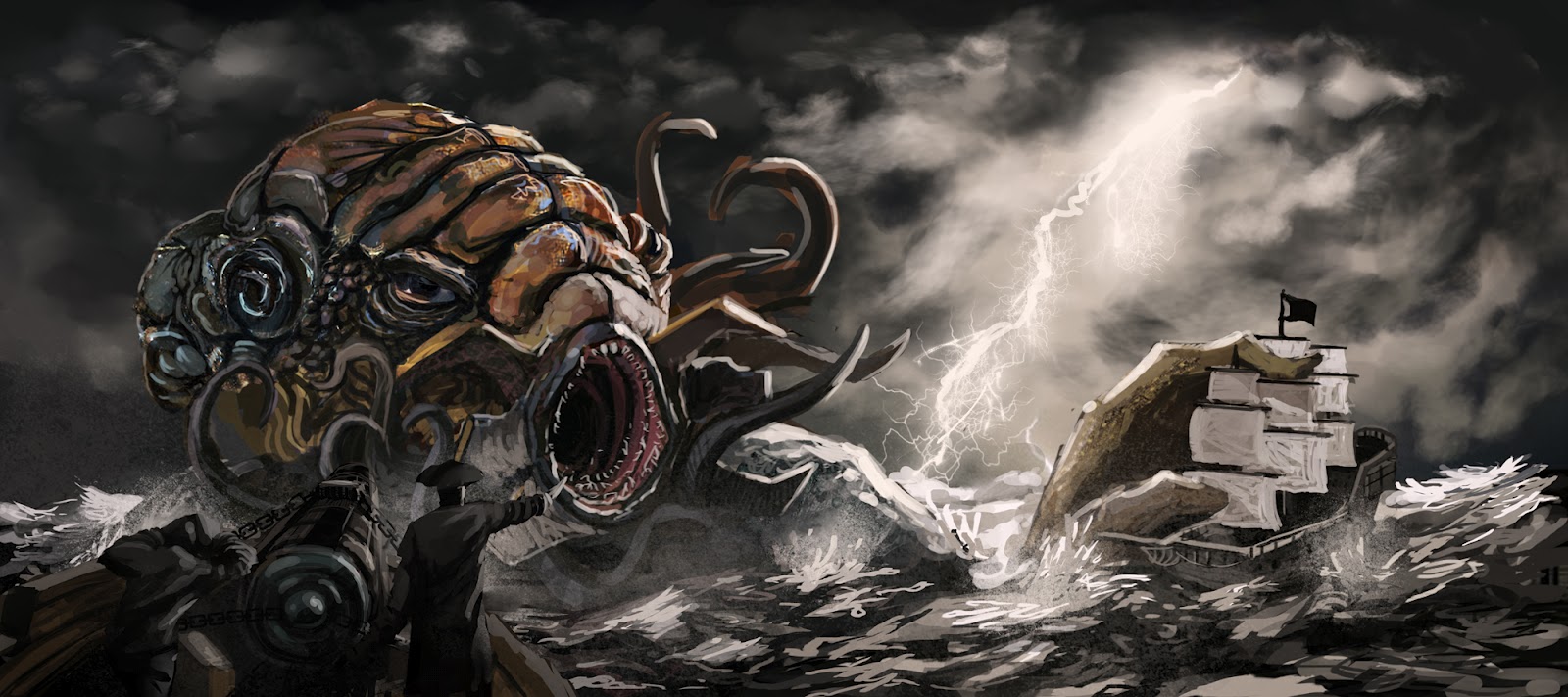
Cthulhu Kraken

Another update!

Sketch

Blocking in color and value, borrowed an image with a lightning strike.

Changed hand position into something more natural. Refined the face and took out the outline. Added minor details such as the teeth.

Blocking in values and textures, added face tentacles. Also added mouth covers like those of Predator's.

Started detailing the sea, wanted to achieve the stormy sea, shit about to go down feel.

Added some splashes of objects so that they interact, also the splashes helps with the scale.

Added values for the sky.

I start detailing the clouds with a few cloud brushes I have, and I intensified the lightning.
Added values on the foreground guys, and mist around the splashy areas. Also used the mist to act as an environment fog to distance the subjects.

Added sparks and explosions from the cannon.

Reduced the size of the explosion on the monster to proper scale, added more tentacles to help with composition / eye tracking. Also refined the monster a little and added some color and lighting properties on the foreground guys.

Detailing the monster, added specular around for the wet effect.

Further detailing on the monster's face, and extra mist on the tentacles.

More mist and fog to push the subjects further or nearer. Added some lights to show that the cannons are firing from the right ship. Fixed captain's left arm.

Flipped the canvas as this gave the more uneasy feeling. Also did some tweaking around the hand sinking the ship, and added more contrast on the monster's face.


This was a fun ride. Hope you enjoyed the progress shots. =) Will be back with more!

Wednesday, July 11, 2012

Update and Progress Shots

Back in Malaysia and painting during sem break. 

Medieval Market

Been motivated by doing something with markets. So here's a quick one on a medieval kind of market.


Black Market City

Then I told to myself, let's do something similar but change the era to more, modern futuristic. I also wanted to push the painting further compared to the medieval market. In the end this was and is a challenge, painting cities and getting the feel of a bustling one is something unfamiliar to me, so this was really a good practice. Below is the progress.

Started out with a rough sketch, the lines are quite wobbly. =/

Blocked in some values, along with some awful choices of color.

Desaturated the colors, and added some lights and details to get the feel.

Added more lights and some signs.

Adding more details.

Making the buildings tighter with details, used some photographs to create the light texture. Fixing the wobbly parts by straightening the edges and adding light effects.

A little bit more detailing and adjustments, extracted some windows from textures and pasted them here and there... and done!


Giant Elephant Pirates

I feel that my biggest weakness so far are scale, and controlling my foreground, mid ground and background. Most of the time I like to squeeze my subject matter in the entire canvas, which probably kills the composition in most cases. So my objective for this image was clear, present scale and distance.


Rough silhouette of elephants and environment, both in different layers.

Adding some values on the elephants.

Painting clouds, used a panorama sky photograph and painted over it. Mainly borrowed values from there and painted clouds according to my perspective, to achieve the feel that the vanishing point of the clouds are at the main city.

Darkened the elephants to pop them out more and added minor details here and there.

Before this was doing for a local day kind of feel, then decided to go for dusk. Just felt that a warmer mood is more suitable. Huge jump in detailing the elephants, still working on them in grayscale.

Added some reddish purple farther away it got from the city, to suggest that the sun going down from behind the main city. Also added foreground buildings to further push the scale.

Gave the blooming effect from where the sun is setting, and toned down the texture of the clouds as it looked  too artificial and distracting.

Added some occlusion effect on the elephants, and painted some colors in.

Added the effects and extra details such as the chain, ray of lights shooting out from behind the city. Also refined the floor by giving it some depth. Also overlayed some elephant skin texture on the elephant in front, at about 20~30% opacity.

Added more effects such as disturbed sand or distant /environment fog to differentiate what is in front or behind and dust flying cause of the elephant's foot's impact. Did a bit of cleaning up and defining the city behind.


That's it for now, hope you enjoyed this update.
More to come. =)

Tuesday, June 19, 2012

Lasalle Diploma Final - Red Town

Project : Lasalle Diploma Final
Title : Red Town
Produced by : Shaun Yow Ken Jie & Nadia Santoso
Time : 5~6 months

Song : Cliff Richard - Devil Woman (1976)
We take no credits in the song.


Friday, March 30, 2012

Mob Box - Project Olive (a.k.a. Red Town) Update 002

Mood Board for Red Town

Had some fun exploring with colors and style. Pretty happy with the results. :D
Hopefully the 3D version can achieve the same look and feel.


Wednesday, December 14, 2011

Speaking of Maquette

From a previous post : http://yowkenjie.blogspot.com/2011/09/frankenrina-part-2.html


Took me 5 days to finish I think. Had lots of fun with this fellar, can't wait for the next maquette project. :D

Monday, December 5, 2011

Gambit and Rogue

Fan art jam thingie with a Marvel fan friend, Nat Wee. Waiting to see her portrait of Gambit. :D

This painting was really experimental to some extent, because I started out with my usual silhouette, but thing time I cut out / add details into the silhouette, creating that ink feel that comics usually have.

As I started painting, I was going through a series of different techniques that I've rarely / never used before, which was quite exciting. But in the end, I noticed that there was yet alot of error in proportions and volume, which you will see in the WIP pictures below. =)


Final


Rough Silhouette Sketch / Layout
I decided to tilt gambit and perform yet another foreshortening attempt. I pretty much decided to throw in Rogue late after refining Gambit's silhouette for composition sake and as a request. :D


Colour Blocking
Pretty much just applying the flat colours.


Colour Blocking +
Hehe, further refining and adding some details, but still working with a big brush and having the canvas thumbnail size to see the overall picture clearer. But at this part I noticed his left hand to be broken and out of place, so...


Further Refinement
Using the lasso tool, and some tweaking, I adjusted the left arm to a more suitable position. Then I jump into adding details, like the eyes, making the face more 3D and refining the hair a little to give it some shape and volume.


A Little Bit More Tweaking
Here basically I'm pretty happy with how it is looking, though I noticed that the torso might be a little too long, so as usually, I used the lasso tool and shortened it. Other than that was further refining of the hair and I am done.


Final Touches
I jump into adding the effects, and further enhancing the image by increasing the contract, making some areas darker or brighter, just to bring out Gambit and Rogue. I added a little orange tint on Gambit's coat to bring it out a little more.


 Final - Final Touches
This is after some C&C from friends. =) I refined and added finer details and textures. Also made adjustments to the right hand, improved drapery and hair. Changed Rogue's hair from red to brown. :D


That's basically my Work in Progress for this piece, had loads of fun on this while exploring different techniques to accomplish some obstacles.